Whitelist Instructions
You’ll need to whitelist my email address to ensure you receive updates from me with my best strategies and lessons from me!
Follow these Instructions for Gmail:
1. In your inbox, locate an email from “Dan Thorpe” or hq@guitardomination.net
2. Drag this email to the “primary” tab of your inbox.
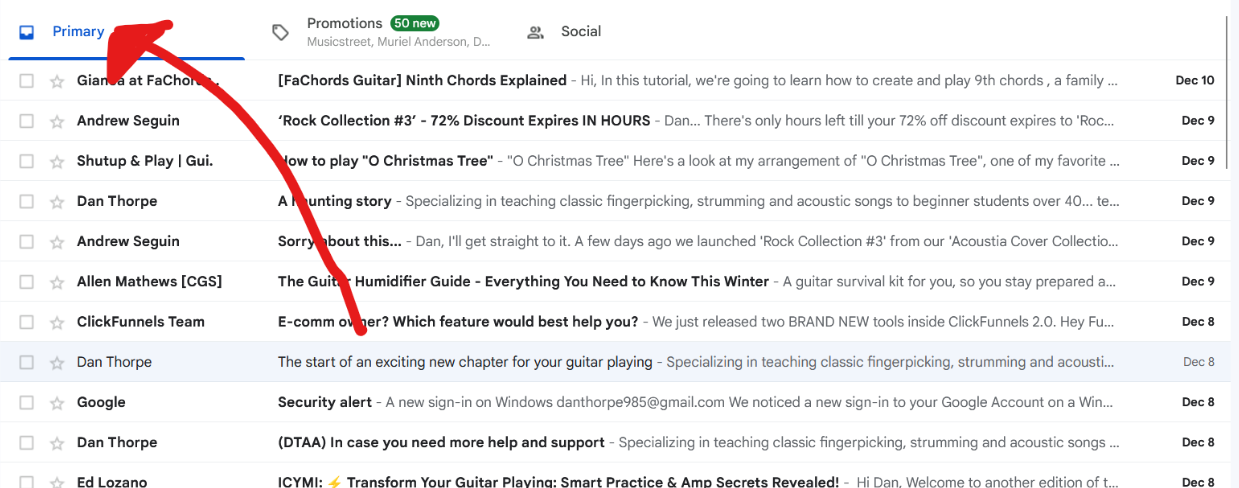
3. Click “Yes” when offered the option to do this for future messages from hq@guitardomination.net
4. You’ll see that my emails will go to your primary folder in the future!
For other email service providers (Yahoo, AOL, etc.) please add us as a contact in your address book. Further instructions can be found here.